10 Slots

106.04 kr  /MO
ex. VAT
  • 10 Slots

20 Slots

212.19 kr  /MO
ex. VAT
  • 20 Slots

30 Slots

280.44 kr  /MO
ex. VAT
  • 30 Slots

Custom

FROM

10.40 kr 

/Slot /MO
ex. VAT
  • 10 - 30 Slots


The road to 7DTD v2.0 - Stormsbrewing Update has begun! You can now deploy your 7 Days to Die server with the 7DTD v2.0 - Stormsbrewing Update. Read more about the update on our blog.


What is 7 Days to Die?


7 Days to Die is a zombie hoard crafting survival game where the primary goal is to survive for as long as possible. After each day has passed, the zombies get harder to defeat and become even more aggressive towards the players. The game is constantly being updated with new content, and the community is always creating new mods to enhance the gameplay experience.

Once the player has spawned into either a randomly generated world or a preset map called Navezgane, there are lots of maps available, including modded 7D2D maps. There are houses, cars, and all sorts of other buildings you can hide and gather resources from to aid survival. You can craft, destroy, and manipulate many objects.

7D2D server rentals come with backup and restore functionality, a familiar easy-to-use and interactive control panel, and full FTP file access. You can edit your server configuration files to change the settings of your server, such as difficulty, loot respawn time, and more. All while running on the latest and greatest server hardware available.

7 Days to Die is a game that has been around for a long time, and it has a large community of players and modders. The game is constantly being updated with new content, and the community is always creating new mods to enhance the gameplay experience.

We have a configuration editor for easily setting up your server, and of course, mod support with one-click installations for popular mods. We're always adding new mods to our control panel for you to play, and if one is not available, we can install it for you!


For more information, check out the Steam Page.


Check out the trailer

Watch the trailer and see what 7 Days to Die to offer, with version 2.0 now available on our 7 Days to Die Server Hosting!


  • Random Gen & Navezgane
  • Alloc's Server Fixes & Oxide
  • Experimental & Stable versions
  • TCAdmin control panel
  • Full FTP file access
  • One-click mod installations
  • A16, A17, A18, A19, A20 and A21 Available
  • 7D2D v1.0 Available
  • 7D2D v2.0 - Storms Brewing Update Now Available
  • Backup & Restore functionality
  • Easy to use Configuration Editor
  • 7 Days to Die web interface
  • 4 Ghz+ processor with NVME SSD storage
  • DDoS Protection
  • 24/7 Support
  • Instant Setup

Our 7D2D one-click installer!

Easily install your favourite 7D2D mods!
Shown here are just some of the mods available.

If a mod you want is not listed, just submit a ticket and we will install it for you!

Additions

7D2D Experimental

7D2D Experimental Game Server Hosting

Alloc's Server Fixes

7D2D Game Server Hosting With Alloc's Server Fixes

Bad Company
Server Manager

7D2D Game Server Hosting With Bad Company Server Manager

Oxide / UMod

7D2D Game Server Hosting With Oxide / UMod

Botman

7D2D Game Server Hosting With Botman

BadPanda

7D2D Game Server Hosting With BadPanda

ServerTools

7D2D Game Server Hosting With ServerTools

Overhauls / Expansions

Darkness Falls


Standard & BBM

7D2D Darkness Falls Game Server Hosting

Ravenhearst


All versions & addons

7D2D Ravenhearst Game Server Hosting

Valmod


Overhaul & Expansion - BBM Available

7D2D Valmod Game Server Hosting

War of the Walkers


Standard & BBM

7D2D War of the Walkers Game Server Hosting

Starvation


Standard & BBM

7D2D Starvation Game Server Hosting

Borderlandz

7D2D Borderlandz Game Server Hosting

Undead Legacy

7D2D Undead Legacy Game Server Hosting

UI Mods

Simple UI


All versions & addons

7D2D Game Server Hosting With Simple UI

SMXui By Sirillion


Standard & BBM

7D2D Game Server Hosting With SMXui By Sirillion

Prefabs

Compo-Pack

7D2D Game Server Hosting With Compopack

DDoS Protection

DDoS Protection

Always-on DDoS protection keeps your 7DTD world online.

Instant Setup

Instant Setup

Spin up a fresh server in minutes and start surviving.

Mod Support

Mod Support

Install popular 7D2D mods and overhauls with one click.

Fast Servers

Fast Servers

High clock CPUs and NVMe storage for smooth hordes.

Awesome Support

Awesome Support

Get help fast for configs, updates, and performance.

Control Panel

Control Panel

Manage settings, backups, and world files easily.

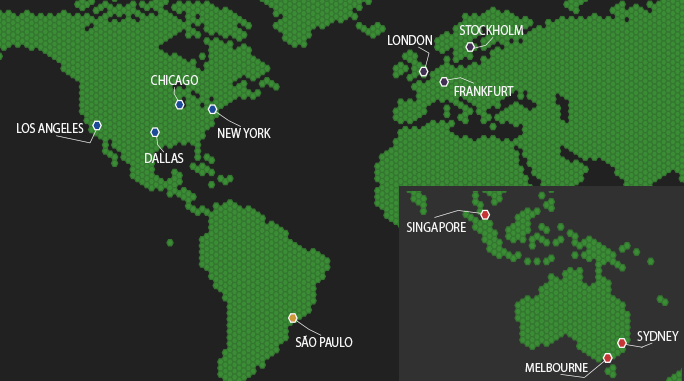
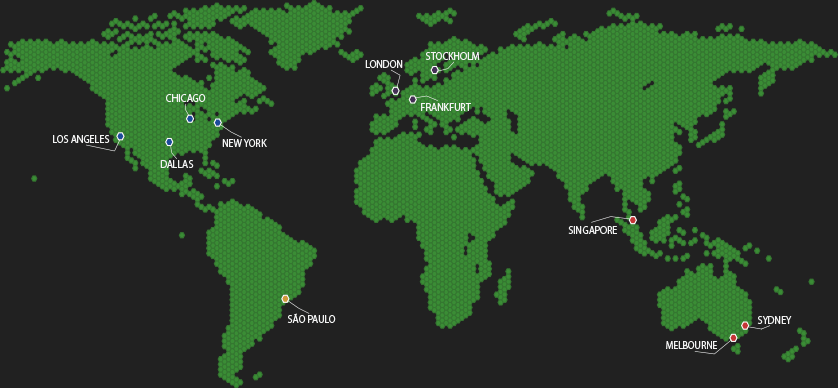
Our Server Locations

Choose a server location that is closest to your target audience for optimal performance.

Our Server LocationsOur Server LocationsOur Server Locations

Latest 7 Days to Die News

Updates, tips, and server guides for 7DTD players.

Top 5 Places to Loot in 7 Days to Die

12th Nov 2025

Top 5 Places to Loot in 7 Days to Die - In version v2.4

In today's blog, we will be showing you some of our top 5 places to get loot in 7 Days to Die on version...

7 Days to Die Storms brewing 2.0 Update Released

8th Jul 2025

7 Days to Die Storms brewing 2.0 is now released!

The new 7D2D Update, Storms' Brewing, has been released by the Fun Pimps, and it's already looking to be an exciting update to the...

What's new in 7 Days to Die version 1.0 launch

24th Jun 2024

What to expect in the 7 Days to Die 1.0 Update

7 Days to Die has been in development for twelve years, but as of the release of the upcoming 1.0 update this month, it...

7 Days to Die Hosting FAQ

Answers for 7D2D servers covering maps, saves, mods, settings, and performance.

Yes. Upload or generate a new world and change the map settings in your config, then restart the server to load it.
Use the one-click mod installer in the control panel or upload files via FTP, then restart. We can add missing mods on request. See How to install Oxide and Oxide Plugins.
Edit your server config via the panel or FTP, then restart to apply changes.
Yes. Upload the save folder via FTP and restart to load it. Use the backup tool before updates or major changes. Need a fresh start? See How to wipe your 7D2D world.
Large bases, many players, and AI-heavy mods add load. Try lowering zombie counts, setting scheduled restarts, and keeping backups.